Here I’m going to continue the thread from the previous post, where we started to look at the concept of Runnables, which is really what puts the “Chain” in “LangChain.”

The name “LangChain” isn’t just branding. It literally describes what the framework does: it helps you chain together components to build language model applications. A “chain,” in this context, is a sequence of operations where the output of one step becomes the input to the next. Think of it like an assembly line: raw materials go in one end, pass through various stations, and a finished product comes out the other end.
Here’s a fun fact: with most of the code we’ve written so far in this series, we’ve actually been building a chain manually.
- Prompt template takes our input data → produces formatted messages
- Model takes those messages → produces a response object
- Content is extracted from the response
This is orchestration, by which I mean coordinating multiple components to work together toward a goal. Right now, we are the orchestrator, manually passing data between steps. LangChain can handle this orchestration for us.
The Idea of Orchestration
In real-world LLM applications, you’re rarely just sending one prompt to one model. You might need to retrieve relevant documents from a database, format those documents into a prompt, send the prompt to an LLM, parse the LLM’s response, and store the results somewhere. Along the way you probably want to handle any errors or retries.
Doing all this manually gets messy fast. LangChain’s chain abstraction lets you compose these steps declaratively, making your code cleaner, more reusable, and easier to reason about. (All of which are internal qualities!) Thus, Runnables: LangChain’s solution is the Runnable interface, which is a standardized way for components to connect and pass data to each other.
Let’s go back to some simple code we had in a previous post:
|
1 2 3 4 5 6 7 8 9 10 11 12 13 14 15 16 17 18 19 20 21 22 23 24 |
from langchain_ollama import ChatOllama from langchain_core.prompts import ChatPromptTemplate MODEL = "qwen3:latest" model = ChatOllama( model=MODEL, base_url="http://localhost:11434", ) system_prompt = """ You are an expert in explaining Einstein's relativity to non-specialist audiences. """ prompt_template = ChatPromptTemplate([ ("system", system_prompt), ("human", "How would you explain {concept}?") ]) prompt = prompt_template.invoke({"concept": "time dilation"}) response = model.invoke(prompt).content print(response) |
Here, the model variable is essentially a runnable object. Put another way, ChatOllama implements a Runnable interface. The same applies to the ChatPromptTemplate. What we can do is chain the output of the prompt template to the model as an input.
To see this in action, first note that with our code above, we’re doing two invoke operations: one on the template and one on the model. Let’s just create a simple chain instead.
|
1 2 3 4 5 6 7 8 9 10 11 12 13 14 15 16 17 18 19 20 21 22 23 24 |
from langchain_ollama import ChatOllama from langchain_core.prompts import ChatPromptTemplate MODEL = "qwen3:latest" model = ChatOllama( model=MODEL, base_url="http://localhost:11434", ) system_prompt = """ You are an expert in explaining Einstein's relativity to non-specialist audiences. """ prompt_template = ChatPromptTemplate([ ("system", system_prompt), ("human", "How would you explain {concept}?") ]) chain = prompt_template | model response = chain.invoke({"concept": "time dilation"}).content print(response) |
Incidentally, if you were to run this code hooked up to LangSmith, what you would see is that LangSmith would be showing you a RunnableSequence, whereas prior to this, without the chain part, you would just see ChatOllama entries.
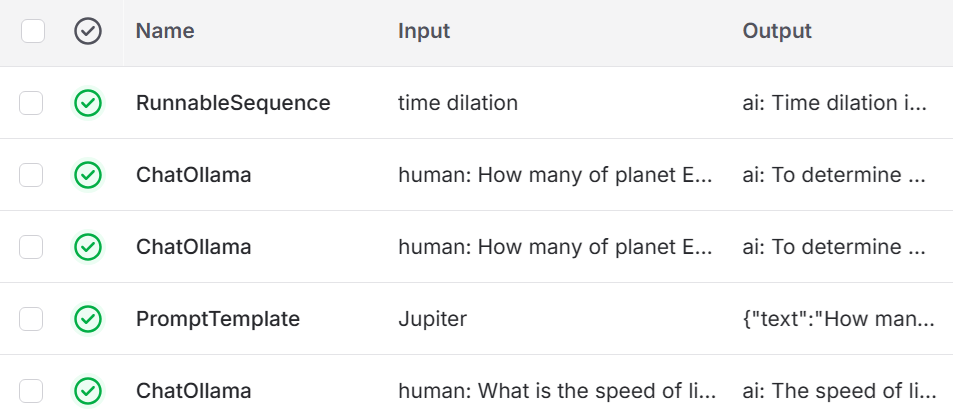
Did this change do much for us? With this minimal example, the honest answer is: not really. We’ve replaced one line of code with a different one, and … that’s about it. Yet, notice that rather than having multiple invoke calls (on template and model), we now just have one (on the chain).
Even with this simple example, you can probably see that the value of chaining becomes apparent when you start building pipelines with multiple processing steps. The | operator (called the “pipe”) lets you connect components in sequence, where the output of one becomes the input of the next.
Output Parsing
Let’s try one more chaining idea here to make the concept a little more applicable. Specifically, let’s use a string output parser to get the results.
|
1 2 3 4 5 6 7 8 9 10 11 12 13 14 15 16 17 18 19 20 21 22 23 24 25 |
from langchain_ollama import ChatOllama from langchain_core.prompts import ChatPromptTemplate from langchain_core.output_parsers import StrOutputParser MODEL = "qwen3:latest" model = ChatOllama( model=MODEL, base_url="http://localhost:11434", ) system_prompt = """ You are an expert in explaining Einstein's relativity to non-specialist audiences. """ prompt_template = ChatPromptTemplate([ ("system", system_prompt), ("human", "How would you explain {concept}?") ]) chain = prompt_template | model | StrOutputParser() response = chain.invoke({"concept": "time dilation"}) print(response) |
Notice that specific change to line 23. We’ve removed the call to extract the content. Yet, if you run this, you’ll see that you are in fact just getting the content. That’s what the string output parser does. Specifically, the StrOutputParser is one of LangChain’s fundamental output parsers that converts raw LLM or ChatModel responses into simple, plain text strings, extracting the content from message objects.
You might think this is somewhat useless. After all, we were able to print the content from the response before without adding some other output parser to the chain. However, by adding StrOutputParser, we define a clear “contract” for our chain: it will always return a plain string. This makes our code model-agnostic; whether our Ollama model returns a complex message object or a simple string, the rest of our application only ever sees clean text.
So, yes, it’s a small change here, and honestly quite simplistic at this point, but it teaches the pattern of “output parsers” which becomes essential when you need structured data (JSON, lists, custom objects) from LLM responses or you need to standardize on how different LLM models return information.
Multiple Chains
Let’s try yet another variation, on our script, this time changing up our prompt.
|
1 2 3 4 5 6 7 8 9 10 11 12 13 14 15 16 17 18 19 20 |
from langchain_ollama import ChatOllama from langchain_core.prompts import ChatPromptTemplate from langchain_core.output_parsers import StrOutputParser MODEL = "qwen3:latest" model = ChatOllama( model=MODEL, base_url="http://localhost:11434", ) prompt_template = ChatPromptTemplate([ ("system", "You are an expert in entertainment history."), ("human", "Provide a list of {concept} along with budget details.") ]) chain = prompt_template | model | StrOutputParser() response = chain.invoke({"concept": "box office disasters"}) print(response) |
This will run similarly to what we’ve been doing before. However, with this in place, let’s now add a chain to our existing chain.
|
1 2 3 4 5 6 7 8 9 10 11 12 13 14 15 16 17 18 19 20 21 22 23 24 25 |
from langchain_ollama import ChatOllama from langchain_core.prompts import ChatPromptTemplate from langchain_core.output_parsers import StrOutputParser MODEL = "qwen3:latest" model = ChatOllama( model=MODEL, base_url="http://localhost:11434", ) prompt_template = ChatPromptTemplate([ ("system", "You are an expert in entertainment history."), ("human", "Provide a list of {concept} along with budget details.") ]) response_chain = prompt_template | model | StrOutputParser() title_chain = ChatPromptTemplate.from_template("Get me just the titles from the {response}.") full_chain = {"response": response_chain} | title_chain | model | StrOutputParser() response = full_chain.invoke({"concept": "box office disasters"}) print(response) |
I’m spacing out the code a bit so it’s easier to see what’s going on. When I ran this, what I got was:
Here are the titles from the list of box office disasters:

1. **The Room** (2003)
2. **Cats** (2019)
3. **Batman & Robin** (1997)
4. **Fantastic Voyage** (1966)
5. **Jaws: The Revenge** (1987)
6. **Attack of the Clones** (2002)
7. **Alvin and the Chipmunks** (2007)
8. **Superman IV: The Quest for Peace** (1987)
9. **Fantastic Four** (2005)
10. **Gremlins 2: The New Batch** (1990)
11. **The Last Starfighter** (1984)
12. **The Land Before Time** (1988)
13. **The Mummy Returns** (2001)
14. **The Mummy** (1999)
15. **The Land Before Time** (1988)
Now we’re seeing the real power of LangChain’s orchestration capabilities. Instead of a simple linear pipeline, we’re building a chain that calls another chain, creating a multi-step workflow.
- In this code, we create our first chain,
response_chain. This takes a concept (like “box office disasters”), formats it into a prompt asking for movies and budgets, sends it to the model, and returns a clean string response. - We also define
title_chain. This is a prompt template that asks the model to extract just the titles from some response text. Notice the {response} placeholder: this is where we’ll inject the output from our first chain. - Here’s where it gets interesting. We then build
full_chainby composing these pieces together.
This pattern of using one LLM call to generate data, then feeding it into another LLM call for refinement is incredibly common in real applications. An application might do various things in this context.
- Generate a draft, then ask the model to improve it
- Retrieve documents, then ask the model to summarize them
- Get a verbose response, then extract structured data from it
By chaining these operations declaratively with the pipe operator, the code stays clean and readable, even as the logic becomes more sophisticated. Each chain is reusable and testable on its own, but they compose seamlessly into complex workflows.
From a testing standpoint, notice how the context of the chains matters quite a bit. What we’ve done here is effectively structure a series of test conditions around some data conditions. Further, that idea of composability (an internal quality) is extremely important in testing.
Parallel Execution
Once you get into chained aspects like this, the idea of optimization starts to rear its head. Obviously testing for that optimization matters. For this part, if you want to play along, you’ll want to grab another model from Ollama’s library. Here I’ll grab Llama 3.
ollama run llama3
You don’t have to use this model. You can use whatever you want. If you’re curious about DeepSeek, go ahead and grab that one.
Let’s switch up a bit and refine the logic:
|
1 2 3 4 5 6 7 8 9 10 11 12 13 14 15 16 17 18 19 20 21 22 23 24 25 26 27 28 29 30 31 32 33 34 35 |
from langchain_ollama import ChatOllama from langchain_core.prompts import ChatPromptTemplate from langchain_core.output_parsers import StrOutputParser from langchain_core.runnables import RunnableParallel MODEL_001 = "qwen3:latest" MODEL_002 = "llama3:latest" model_001 = ChatOllama( base_url="http://localhost:11434", model=MODEL_001 ) model_002 = ChatOllama( base_url="http://localhost:11434", model=MODEL_002 ) prompt_template = ChatPromptTemplate([ ("system", "You are an expert in entertainment history."), ("human", "Provide a list of {concept} along with budget details.") ]) response_chain = prompt_template | model_001 | StrOutputParser() title_chain = ChatPromptTemplate.from_template("Get me just the titles from the {response}.") full_chain = {"response": response_chain} | title_chain | model_002 | StrOutputParser() parallel_run = RunnableParallel(chain1=response_chain, chain2=full_chain) response = parallel_run.invoke({"concept": "box office disasters"}) print(response["chain1"]) print(response["chain2"]) |
Yikes! That’s a lot.
As a tester, if you are used to looking at sequence based logic, you might take issue with the logic here. Think about what it means to run something in parallel. I’ll come back to this!
In previous examples, our chains executed sequentially: one step finishing before the next began. But what if we want to run multiple operations at the same time? LangChain provides RunnableParallel for exactly this purpose. Here, we’re creating a parallel runnable that attempts to execute two chains simultaneously.
The idea here is straightforward: give both chains the same input ({“concept”: “box office disasters”}) and run them at the same time, collecting their results into a dictionary with keys “chain1” and “chain2”. Notice we’re also using two different models: qwen3 for model 1 and llama3 for model 2. This shows that chains can work with different LLMs, each with their own characteristics and performance profiles.
Think about that from a test configuration standpoint!
However, there’s a critical issue with this setup that prevents true parallel execution. Look closely at the chain definitions:
- response_chain: Completely independent; takes the input and generates a response
- full_chain: Depends on response_chain; it uses {“response”: response_chain} internally
In this script, when we execute parallelRun.invoke(), LangChain is smart enough to detect this dependency. It can’t actually run both chains in parallel because full_chain needs the output from response_chain to proceed. So, what happens is:
- response_chain executes first (using model_001)
- full_chain waits, then executes once it has the response (using model_002 for both its steps)
- Both results are returned in the dictionary
The result? Despite using RunnableParallel, we’re still executing entirely sequentially. The parallel construct has no effect here because of the dependency chain.
This is an important lesson (which testing can expose, even if it’s a bit of an obvious thing): parallel execution only works when the operations are truly independent. To see real parallel execution, we need chains that don’t depend on each other’s outputs: for example, asking two different models the same question, or processing different aspects of the input simultaneously.
This is effectively creating a different test case. Let’s make a true parallel execution.
|
1 2 3 4 5 6 7 8 9 10 11 12 13 14 15 16 17 18 19 20 21 22 23 24 25 26 27 28 29 30 31 32 33 34 35 36 37 38 39 40 41 |
from langchain_ollama import ChatOllama from langchain_core.prompts import ChatPromptTemplate from langchain_core.output_parsers import StrOutputParser from langchain_core.runnables import RunnableParallel MODEL_001 = "qwen3:latest" MODEL_002 = "llama3:latest" model_001 = ChatOllama( base_url="http://localhost:11434", model=MODEL_001 ) model_002 = ChatOllama( base_url="http://localhost:11434", model=MODEL_002 ) prompt_template_001 = ChatPromptTemplate([ ("system", "You are an expert in entertainment history."), ("human", "Provide a list of {concept} along with budget details.") ]) prompt_template_002 = ChatPromptTemplate([ ("system", "You are an expert in entertainment history."), ("human", "Provide a list of {topic} along with development costs.") ]) response_chain = prompt_template_001 | model_001 | StrOutputParser() full_chain = prompt_template_002 | model_002 | StrOutputParser() parallel_run = RunnableParallel(chain1=response_chain, chain2=full_chain) response = parallel_run.invoke({ "concept": "box office disasters", "topic": "game studio disasters" }) print(response["chain1"]) print(response["chain2"]) |
What this shows is that to demonstrate actual parallel execution, we needed to redesign our chains. One of them, in fact, is removed: the title_chain. Specifically, we restructured the prompts to be completely independent.
- prompt_template_001 asks about {concept} and requests budget details
- prompt_template_002 asks about {topic} and requests development costs
Notice we’re now using different placeholder names (concept vs topic) and asking different questions. Each chain can now operate completely independently and neither needs to wait for the other. We provide both inputs at once. When RunnableParallel receives this input, it can immediately dispatch both chains:
- chain1 extracts “concept” and starts processing with model_001
- chain2 extracts “topic” and starts processing with model_002
Because there’s no dependency between them (chain2 doesn’t need chain1’s output), both LLM calls can happen simultaneously. On a machine capable of running both models at once, this cuts the total execution time roughly in half compared to running them sequentially.
There is a trade-off, however. Yes, we gained parallel execution. However, we lost the ability to have one chain process the results of another.
The main point of this exercise was to show you that setting up the prompt conditions matters quite a bit for what you are hoping to test. If you want to test speed improvements based on parallel execution, making sure that the prompts are truly independent is necessary.
In fact, what this also shows is that the development tasks (what it makes sense to construct) and the testing tasks (executing the construct) are entirely aligned. A bad test would be a bad construct. A bad construct would be a bad test.
Next Steps!
You’ve probably noticed these examples are getting steadily more complicated. You might be wondering: Am I learning how to test these things or how to build them? Well, in truth, I would argue a large amount of that distinction is likely going away in the future.
I talked about this in one context regarding applying test thinking to code. I also talked about this a bit when I talked about testers acting like developers.
So, yes, so far this series has taken us down part of the path of writing logic for an AI-enabled application. What I’ve done is introduce you to just three parts of this overall toolchain: Ollama, LangChain, and LangSmith. Along the way, I’ve been working to show how test thinking applies at all levels.
In the next post we’re going to write a large test case together, bringing in all the elements we’ve looked at in this series of posts so far. That will then set us up for looking at a particular testing tool in this context.
