Much like my Test Defender post, this post’s title is a bit of a double entendre. It’s (hopefully) going to be an adventure but it’s also testing Adventure. And, yes, there will be something about AI in all this.
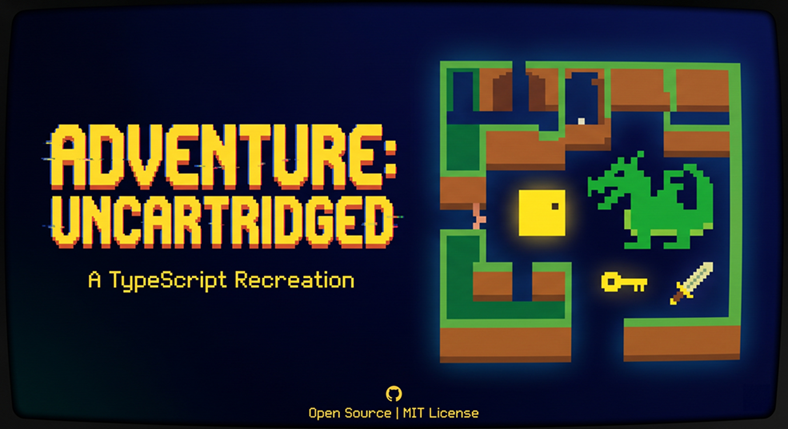
So, imagine a time when home video games were mostly simple arcade ports (like Pong or Space Invaders) where players just shot at targets or chased a high score on a single screen. Yep, you guessed it. I’m talking about the Dark Ages as the 1970s slipped into the 1980s. In this context, a game called Adventure was the first action-adventure game on a console. Specifically, on the Atari 2600. It allowed players to explore a vast (well, vast for the time) world spanning multiple screens, carry items in an inventory (or, rather, attached to your body), and search for a legendary artifact. It was almost exciting.
Because I clearly know how to use my time wisely, I decided to create a modern version of this. Well, modern insofar as it’s an exact recreation, but playable in a browser. So, retro-modern? Modern-retro? I have no idea. It’s called Adventure Uncartridged. It’s open sourced so you can make fun of it. And it’s directly playable online so you at least know what you’re making fun of.
If you’re thinking, “Wow, that looks hideous!”, well, don’t blame me. Blame the 1980s. You know, retro.
For purposes of this blog post, I want to talk about testing this game. Don’t worry! I already covered testing like it was 1980. We’re not quite going to do that.
If you are someone who is a tester or who has to think like a tester, and thus adopt the testing role, it’s worth looking at this game and considering how you would test it. Awhile back I wrote a Test Quest game that I used for interviews, because I found then, and still do today, that you can learn a whole lot from watching someone decide how to test a game; moreso than any other application.
Purpose and Audience
So let’s keep in mind some crucial context here: this is a port of the original game, staying as true to the original as possible. (That’s for better and worse, mind you.) One goal of testing this game is to find every place where the browser version behaves differently from the 1979 Atari 2600 original. Playability and a stable build matter too, but fidelity comes first.
Wait, playability is secondary? It would seem like a primary quality attribute, would it not? Well, sure, it is, but remember: if fidelity is the goal, then how playable or not it is would remain a function of what the game was. That’s important to keep in mind. Unless they have a time machine and don’t mind altering the past, any bugs a tester wrote about pure playability would be entirely missing the point.
This strategy serves two kinds of test thinking, and most sections I talk about here are marked for one or both.
- Testers who explore by playing. The live game, the manual, an emulator; using keyboard, notes, screen recordings, and a healthy dose of nostalgia.
- Testers who explore the code. The TypeScript and (maybe?) 6502 assembly; using the source, the tests, the original assembly listing; involving code review, unit and property tests, and scripted play.
The two tracks feed each other. An exploratory tester can see a dragon behave oddly but can also find the line responsible. A tester who spots suspicious code can also use that finding to try a very precise thing in the game.
What Correct Means
In this context, the original game is the specification. When my version and the original disagree, the default verdict is that my version has a bug. That makes the usual question of how to know what correct looks like unusually answerable.
You can the following sources, in order of authority. And this is what I used as I was creating this and testing this port.
- The original game running in an emulator. The Stella emulator plays the original cartridge image, which ships in my repository at docs/adventure.bin. You could play the same scenario side by side and compare. This is the main oracle for testers. It certainly was for me.
- The annotated assembly listing. docs/adventure.asm is the original source with comments. Many functions in src/adventure.ts mirror a named routine in the assembly. This is a secondary, but still important, oracle for testers.
- The original manual. docs/adventure-manual.pdf describes intended play, but not edge cases.
- Project notes. You, as a reader, have docs/DIFFICULTY.md and docs/ASSEMBLY.md, which explain how specific mechanics work. I didn’t have those, of course, since I had to write them!
Some differences are deliberate, because a browser is not an Atari 2600. The keyboard replaces the joystick, buttons replace the difficulty switches, and keys 1 and 2 stand in for the console’s Reset and Select switches. A tester who finds a difference should first ask whether it’s one of these. Any other deliberate deviation should, of course, be questioned.
It is defensible to ask whether the game should support a joystick even in browser form, but it’s not defensible to say the browser should use the same exact mechanics as those that existed on a physical Atari 2600.
Risk Areas
As in all things, testing effort should follow risk, and the highest risk is a silent translation error from 6502 assembly into TypeScript. This would be a case where the game still runs, but some behavior is subtly wrong. When I was testing, I wrote up the following table that ranks the risk areas this strategy targets.
| Rank | Risk | Why it is risky here | Tracks |
| 1 | Translation errors | The original relies on 8-bit wraparound, bit order and unsigned math that TypeScript does not copy automatically | Technical |
| 2 | Randomness | Game 3 placement and the bat depend on random numbers, so bugs hide until the right roll | Both |
| 3 | Frame timing | The 2600 ran at a fixed rate. A browser runs at the display’s refresh rate, and tabs can be paused | Both |
| 4 | State interactions | Carrying, being eaten, the bat, the magnet and portals can all happen on the same frame | Both |
| 5 | Room connections | Exits change with the game level, so a wrong table entry only shows at one level | Human |
| 6 | Input handling | A keyboard is not a joystick. Keys can stick, overlap or be released while the tab is unfocused | Human |
| 7 | Toolchain drift | Dependency updates can change the formatter, test runner or build without any code change | Technical |
The Game 3 freeze, covered in the case study below, was a rank 2 bug with a rank 1 cause.
Test Layers
The automated tests cover the pure geometry fairly well. Even given that coverage, everything that depends on game state, randomness or input is still tested only by playing. The layers below go from cheapest to most expensive.
| Layer | What it checks | Status | Track |
| Unit tests | Collision, playfield bit mapping, room picks | In place | Technical |
| Property tests | The same functions across thousands of generated inputs | In place | Technical |
| State machine tests | Every transition below, driven by scripted switch presses | Not started | Technical |
| Scripted playthroughs | A recorded input sequence with fixed random numbers, checked against the expected end state | Not started (although see agent section below) | Technical |
| Visual comparison | Each room rendered and compared with an emulator screenshot | Not started | Both |
| Exploratory sessions | Time-boxed play against a charter | Ongoing | Human |
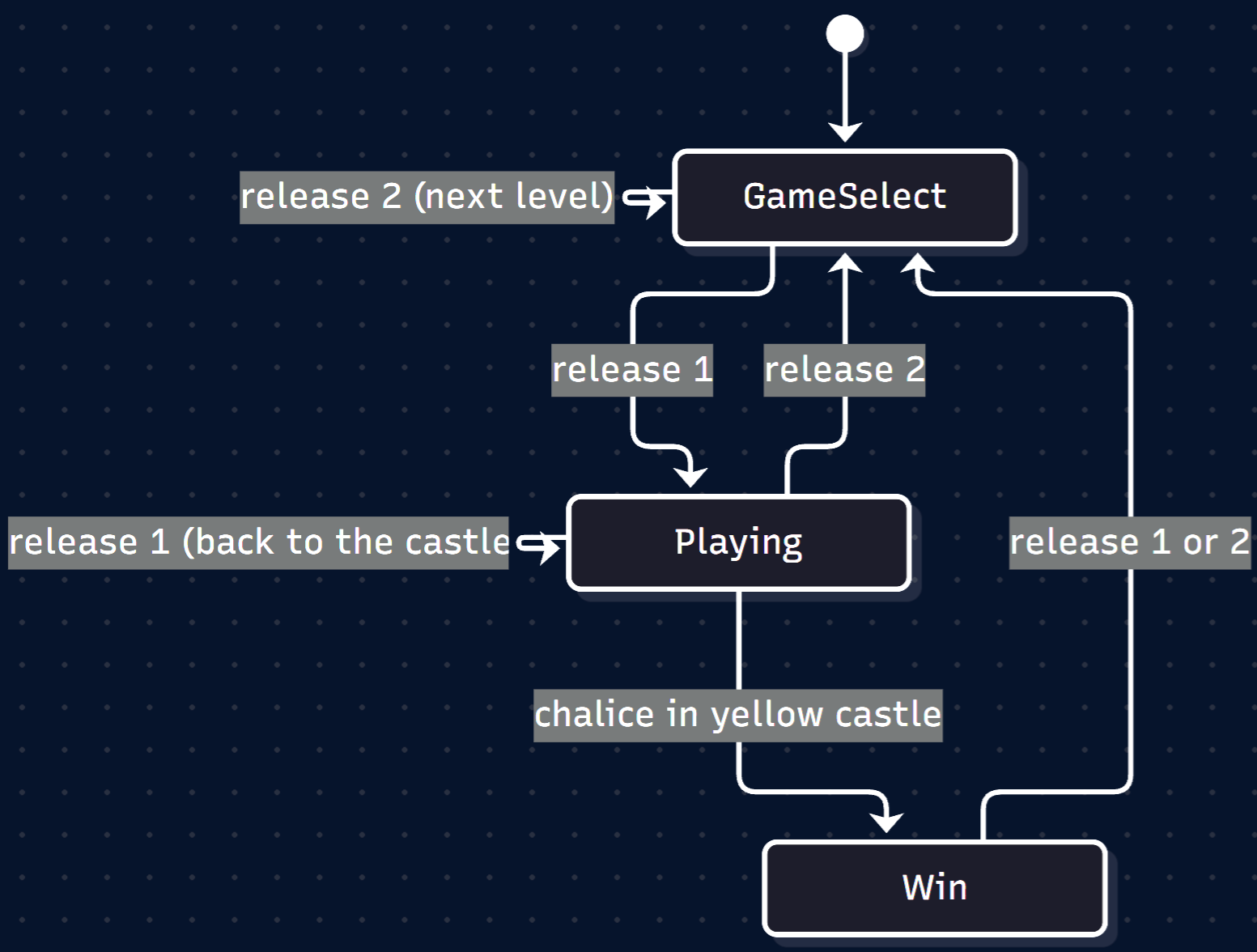
A test I found it was very easy to miss was that a mid-game reset puts the player back at the castle and revives all the dragons, but leaves objects where they are. That’s just how the game worked. Because transitions fire on release, both test types should hold keys down across transitions and release them at awkward moments.
Testability
In the developer role, I worked hard to make sure that the code already had the right seam for deeper testing. Every contact with the browser goes through src/hardware.ts, and the game itself advances one frame per call to startGame. So why are three of those layers still marked “Not started”?
It’s not because I didn’t think of them. (Of course, I would say that, right?) It’s because the tests can’t get at what those layers need. A state machine test has to press Reset and Select on exact frames and then ask the game which state it’s in. A scripted playthrough has to feed in the same key presses and get the same game every time, including in Game 3, where the random numbers decide where everything goes. A visual comparison has to render a room on demand and capture the picture. Right now, the key states are private, the random numbers come straight from the browser, the game’s current state is hidden, and each frame expects a real canvas to draw on. The geometry tests work because geometry is pure: give a function some numbers, check what comes back. Everything else is locked away from a test, so the only way to check it is to play.
In fairness to my developer self, the seam is in the right place. Nearly everything a test needs passes through that one hardware file. But a seam is only useful if a test can actually reach through it, and right now this one is closed. Four small changes would open it.
And here’s where I’d like you to put your tester hat on. Before reading on, look at src/hardware.ts and src/adventure.ts and ask yourself what you would change. What stops a test from pressing a key on frame 200? What stops it from replaying a Game 3 layout? What stops it from asking whether the game is in its Win state? Finding those blockers is a testing skill in its own right. It’s the difference between saying “we should have more tests” and saying exactly what stands in the way of them. I’ve put my four answers at the end of this post, so you can compare with yours, if you choose to give this a shot.
I can tell you that with those in place, a scripted playthrough becomes a list of frame numbers and key changes, plus a seed and an expected end state. This matters for a variety of reasons. One is that an exploratory tester’s bug report could become one of these scripts. Two is that you could use this as the basis for some automation based on that exploration. Three is that you could use AI to assist with this scripting.
Heuristics for Exploratory Play
The heuristics I’m about to talk about need no code. Each one is a way of looking at the game that tends to find bugs. My advice to testers would be to pick a few per session rather than trying them all at once. And if you were actually testing this “for real,” I would say to keep an emulator running the original open for comparison. That’s exactly what I did, when I stepped out of my developer role on this and went into my tester role.
That interleaving of roles is what I talked about regarding how testing knowledge isn’t just a testing skill.
You might want to stop reading and explore the game a bit then come back and see which of the following you tried or thought of.
Moving through the World
- Walk every exit at every level. Room connections change between Games 1, 2 and 3, so an exit that works in one game can be wrong in another.
- Hug the walls. Slide along walls, into corners and through narrow gaps. Collision bugs live at edges, not in open space.
- Cross the screen edge slowly. Step back and forth across a room boundary, one press at a time.
Objects
- Carry everything through everything. Take each object across a room edge, through a castle gate and over the bridge.
- Drop things in awkward places. Drop items inside walls, half off the screen and in a castle gateway as it closes.
- Lock yourself in. Use each key to close a castle behind you and check that you can still get out.
Creatures
- Collide on the same frame. Touch the sword just as a dragon bites. Let the bat grab what you’re holding. Let the magnet pull an object into a wall.
- Play keep-away with the bat. Follow it, block it, and see where stolen items end up.
- Test each dragon’s personality. Yorgle should flee the sword and the chalice. Grundle and Rhindle should hunt. Compare their speeds with the emulator.
Switches and States
- Interrupt every state. Press and release 1 or 2 while being eaten, while carrying, during a roar and after a win.
- Hold keys across transitions. As I said earlier, state changes fire when a key is released, so hold 1 or 2 down and release it at the worst possible moment.
- Flip difficulty mid-chase. The difficulty buttons take effect immediately, so toggle them while a dragon is chasing or roaring.
- Cover the switch matrix. Three game levels times four difficulty settings gives twelve configurations. Check each against the bite delays in the project’s difficulty notes.
Input and the Browser
- Abuse the keyboard. Hold opposite arrows together. Mash several keys at once. Hold space while moving.
- Lose focus mid-move. Hold an arrow, then click another window or switch tabs, and come back. Check whether the player keeps moving.
- Leave and return. Put the tab in the background for a minute, then return. Watch whether the game briefly runs faster than normal.
- Change the display. Play on 60, 120 and 144 Hz screens, in full screen mode and in a small window. Check whether the arrow keys or space scroll the page.
Fidelity
- Find the Easter egg. (For those who know the game, yes, I did implement it!) The secret dot and author room exercise several obscure mechanics at once. If that path works, a lot of fidelity holds.
- Race the emulator. Play the same route in both versions and compare timing, sounds and colors at each step.
Heuristics for Reading the Code
These next heuristics are for testers who can read the TypeScript and the assembly side by side. Each one targets a way that a faithful-looking translation can still be wrong.
Where a heuristic has a clear example in the original, I’ve linked straight to the lines in the annotated assembly listing, so you can see what the TypeScript is supposed to be matching. If you’re not used to reading 6502, the comments down the right-hand side do most of the work.
Again, you might want to take a shot at this yourself before reading on.
Translation from 6502 Assembly
- Check the range math on every random call. Confirm that the result can reach every intended value and nothing outside them. This would have caught the Game 3 freeze that I’ll talk about below. In the original, RandomizeLevel3 stirs a counter into a pseudo-random number and then trims it with and #$1f, which can only ever give 0 to 31.
- Wrap where the ROM wraps. The 2600 stores most values in one byte, so 255 plus 1 is 0. TypeScript numbers do not wrap, so any counter, timer or position that relies on overflow needs an explicit mask. The original’s CheckInput counts on this: inc rolls the low byte over to 0, and only that rollover bumps the high byte. That same low byte is the seed for the Game 3 shuffle.
- Check bit order against the hardware. The playfield registers are read in different directions, and the existing playfield tests pin this down. Apply the same suspicion to sprite and flag bits. The original’s PrintDisplay writes each room line straight into PF0, PF1 and PF2, and the hardware draws PF1 in the opposite bit order from the other two.
- Translate comparisons exactly. The 6502 branches on carry and zero flags, which map to unsigned less-than and greater-or-equal. An inclusive bound written as exclusive is an off-by-one that only shows at the edge. The Game 3 room bounds check is a good one to practice on: bcc rejects a room below the lower bound, then beq and bcs accept the upper bound itself and reject anything above it. Both bounds are inclusive.
- Trace every table index. For a lookup such as the dragon bite delay table, work out the index for every level and difficulty and confirm it lands on the intended entry. The original builds the index by taking one difficulty bit and merging in the level number, which is stored as 0, 2 or 4, and then reads the DragonDiff table.
Game Structure
- Respect the frame split. The game spreads its work across three sub-frames, as the original did. Moving a call to a different sub-frame changes timing and the order of collisions. In the original’s MainGameLoop, three waits for vertical sync divide the loop into those three frames, and the player’s movement is handled once in each, a different way each time.
- Look for state that survives a reset. List every module-level variable and check whether a full reset and a mid-game reset each restore it. A missed one produces a bug only on the second game. The original’s CheckGameStart shows exactly what a mid-game reset restores: the player’s room and position, all three dragons, and the carried object. Objects aren’t touched. It also zeroes the note count, which the person who annotated the listing flagged with “(ops!??)”.
- Read the frame loop for catch-up. The loop advances its clock in fixed steps and runs one tick per display frame. After a long pause, it may tick on every display frame until it catches up, which is faster than normal on high refresh screens. Confirm or rule this out. The original never has this problem: its DoVSYNC routine waits on a hardware timer every frame, so the game can’t run faster than the console.
Claims in Comments and Docs
- Treat comments as claims to test. For example, a comment says the Win state ignores the Reset key, while the Win state’s own handler returns to Game Select when Reset is released. Both can be true, but a test should pin down the exact behavior. And here the original can settle it. A win marks the game as inactive, and a Reset while the game is inactive goes straight back to the game select screen.
- Check that docs still match the code. The difficulty notes still refer to a source file that has since been split up. Stale docs mislead the next tester.
The Build Itself
- Run the whole pipeline before merging a dependency update. Run the check, the tests and the build locally, not just the check. Then confirm CI passes on the merged commit, not only on the pull request.
- Keep toolchain versions pinned. A version range such as latest lets any lockfile regeneration bring in a breaking change. This happened to me once.
Sample Charters
A charter gives an exploratory session a target and a purpose without scripting the steps. Each one below follows the form: explore a target, with some resources, to discover some information. Time boxes are suggestions.
| Charter | Track | Time box |
| Explore Game 3 starts under all four difficulty settings, to discover whether every start gives a playable layout | Manual | 30 min |
| Explore the castle gates with each key, to discover whether the player can be wrongly locked in or out | Manual | 45 min |
| Explore the bat with each carriable object, to discover where stolen items end up and whether any can be lost | Manual | 45 min |
| Explore Reset and Select presses in every state, to discover transitions that leave the game inconsistent | Manual | 30 min |
| Explore dragon encounters side by side with the emulator, to discover differences in speed and bite timing | Both | 60 min |
| Explore the game after leaving its tab in the background, to discover whether the frame loop runs fast while catching up | Both | 30 min |
| Explore the reset code paths, to discover module-level state that survives a new game | Technical | 60 min |
| Explore every random number call against the assembly, to discover range or distribution errors | Technical | 45 min |
At the end of a session, write down what was covered, what was found and what is still unexplored. The unexplored list becomes the next charter. Yet, look at those times! Now, even if those are built with a bit of buffer, it does make you think about regression testing, right?
“But, Jeff, you fool. This is a port. Once it’s done, it’s done, right? Why would we need regression tests?” Well, new browser versions. Or an entirely new browser. Or maybe some styling updates for mobile. And so on.
But … but … what about AI ?!?
AI, as with any automation, can help with that time issue. For a tester, an AI agent that wins Games 1 and 2 is a test instrument, not a player. The question it answers is whether a route that wins on the original also wins here, on the same frames. And continues to do so over time.
A key thing to understand about this game is that Games 1 and 2 are deterministic. Neither this port nor the original assembly uses randomness outside the Game 3 shuffle. Given the same key presses on the same frames, both games should play out identically every time. A winning run can therefore be recorded as an input sequence and replayed. If the port is faithful, the replay wins on the same frame as the original.
Three Kinds of Agent
| Approach | Sees | Acts by | A win shows | Main difficulty |
| Search-based solver | Game state: rooms, objects, positions | Planning a route through the room graph and steering to each target | The win is reachable in this version | Needs the testability changes. It plans rather than learns |
| Reinforcement learning agent | Screen pixels or game memory | Trial and error over many thousands of runs | A strategy learned on one version works on the other only if they match | The game gives one reward, at the very end |
| Vision language model | Screenshots | Choosing key presses and explaining why | Little on its own, but it can follow a charter and describe oddities | Far too slow for real time, so it needs a pause-and-step mode. It can misdescribe what it sees |
The Agent I Built
Looking at that table, I went with the first option: a search-based solver. Partly that was a practical choice. A reinforcement learning agent would need thousands of runs to stumble onto a single reward at the very end (something my Pacumen project showed), and a vision model would be describing the screen long after the dragon had finished eating me. But mostly it was because Game 1 has no randomness. A plan that works once works every time (at least in this context), so planning beats learning.
The goal was simple to state. Have an agent win Game 1 on its own, record every key press it made, and then play that recording back in the real game so I could watch it.
The Seam Pays Off
Remember the testability point about every contact with the browser going through one file? Well, that’s what made this possible. It wasn’t that “AI exists and it can do this for me.” It’s “I’ve instrumented this code in a way that AI can likely use to learn how to play the game just as a human would.” The agent runs the real game code in Node, with no browser at all. A small loader hook swaps src/hardware.ts for a headless stand-in. The stand-in reads input from whatever the agent sets for each frame instead of the keyboard, draws into memory instead of onto a canvas, and doesn’t play sounds.
Nothing else in the game changes. The agent calls startGame once per frame, exactly as the browser’s loop would, and reads the game’s own state between frames: which room the player is in, what they’re carrying, whether a dragon is dead, whether a castle gate is open.
This is the testability work from earlier, just done for a reason. Scriptable input and stepping frames directly stopped being suggestions the moment I needed them.
Test the Instrument First
To plan a route, the agent has to predict where the player will end up after each move. So it carries a model of the player’s movement. I didn’t write that model from a description of how I thought the game worked. It’s built from the game’s own collision checks and room tables, mirroring the movement code step by step: the six-unit moves, the room wraps at the screen edges, the castle entrances, the way a wall hit is undone.
Here’s the thing, though. A model is a claim, and claims (ideally) get tested. Before trusting the planner with anything, a separate check drives the real game with random moves and compares every step against what the model predicted. The latest run checked 98,956 steps with zero mismatches.
I think this is the most tester-flavored part of the whole exercise. An agent planning with a wrong model would fail in confusing ways, and I would have spent my time debugging the agent when the actual problem was its picture of the world. So the instrument gets tested before it’s used to test anything else.
How It Plays
Crucially, the agent doesn’t discover the route. I gave it the one a human would take, as a list of goals checked in order against the game state:
- Take the yellow key.
- Open the yellow castle and go in.
- Take the sword.
- Kill the yellow dragon, then the green dragon.
- Swap the sword for the black key.
- Open the black castle and go in.
- Take the chalice and carry it home to the yellow castle.
Notice: I gave it my intent; not the implementation. For each goal, the agent searches outward from the player’s position, breadth first, until it finds a position where the goal is met. That might be touching the key, or touching a dragon with the sword in hand. The search avoids anything it shouldn’t touch. In Adventure, walking into a carriable object swaps it into your hand, so brushing past the bridge on the way to the key would quietly ruin the plan, since it would now pick up the bridge.
Then it follows the path, one movement cycle at a time. If the game ever ends up somewhere the model didn’t predict, usually because a dragon or the bat moved something, the agent throws the plan away and searches again. When it’s chasing a dragon, it replans on every step, because the target keeps moving. If a dragon eats the player, it presses Reset and starts from the first goal it hasn’t completed yet.
There’s one setting worth mentioning. The run uses the right difficulty switch at A, which makes dragons charge at the player instead of fleeing the sword. That sounds harder, but for an agent it’s easier. Why? Because the dragons come to the sword instead of the agent having to chase them across the map.
But … you actually don’t have to kill the dragons at all to win the game. This was something I did not specifically tell the agent. Just as I didn’t tell Pac-Man everything it needed to know about ghosts and dots. So, realistically, the agent should have opted for difficulty B, right? The dragons just run away. Ah, but the agent knew, based on my constraints, that this would not test some of the most important conditions, such as the dragon chasing you to eat you.
The Result
The agent wins Game 1 in 3,368 frames, which is just under a minute of game time, and no dragon eats it along the way. Its log reads a lot like a test report:
frame      2  game 1 started, difficulty left B, right A
frame     68  done: take the yellow key
frame    134  done: open the yellow castle
frame    140  done: enter the yellow castle
frame    185  done: take the sword
frame    371  done: kill the yellow dragon
frame    677  done: kill the green dragon
frame    731  done: swap the sword for the black key
frame   1889  done: open the black castle
frame   1901  done: enter the black castle
frame   2012  done: take the chalice
frame   3128  the chalice is home: game won
The output is a recording with one number per frame, where each bit stands for a key: up, down, left, right, fire, reset, select. Since Game 1 is deterministic, that recording is the whole game. Playing it back always produces the same win on the same frame.
That also meant I could watch it. The browser version accepts a ?replay= parameter pointing at a recording. While it plays, the keyboard is ignored and inputs are applied per game frame rather than per unit of time, so the playback matches the recording whatever the display’s refresh rate. Here’s that run, filmed from the real page:
I posted a video of this on YouTube if you want to bask in the glory of AI Adventure!
This is where the earlier point about bug reports becoming scripts gets concrete. A recording is a scripted playthrough. If a future change breaks something on the route, replaying the file will fail to win, or win on a different frame, and that’s a regression test nobody had to write by hand.
What It Proves and What It Doesn’t
I have to be careful here, since overclaiming is a failure mode we testers like to spot in others. The agent proves Game 1 can be won in my version, by this route, under these switch settings. It doesn’t prove my version matches the 1979 original. The agent uses my code’s collision checks to plan, so if my translation of the walls were wrong, the agent would happily plan around my wrong walls.
Fidelity needs the original in the loop. The next step would be to get a winning run on the original, for example through the Arcade Learning Environment, which supports Adventure and rewards getting the chalice to the yellow castle. That run would be recorded frame by frame, with the environment’s random input repeats turned off. Then you would replay it in my version and compare the player’s room and position on every frame. The first frame where they differ points at the bug.
One small fidelity check has already passed, though. The original’s win check and mine agree. Both test whether the chalice is in the yellow castle’s inner room.
Heuristics for Judging Agent Results
Building this let me demonstrate a few heuristics that apply to any agent you point at software, not just this game:
- Validate the model before trusting the planner. Whatever the agent believes about the system, check that belief against the real system first.
- Treat a surprising win as a bug lead. If an agent wins by passing through a wall or scoring without the chalice, check whether the original allows the same move.
- Don’t read a failure as evidence. An agent that never wins may simply be a weak agent. Only a replay that diverges is a clean signal.
- Keep determinism intact. The browser’s animation loop varies with the display, so only frame stepping gives repeatable runs.
- Check what an agent claims. Confirm every reported problem against a recording or the game state before filing it. The agent’s log is a claim, just like a comment in the code.
Case Study: The Game 3 Freeze
Starting Game 3 would freeze the browser tab. The bug was found by reading code with the first technical heuristic, confirmed by tests rather than in a browser.
The defect was that Game 3 scatters objects by picking a random room and retrying until the room is within that object’s allowed range. The room was picked like this:
|
1 |
let room = Math.floor(random()) * 0x1f; |
The random number is always below 1, so rounding it down always gives 0, and every pick was room 0. No object is allowed in room 0, so the retry loop never ended. The original assembly masks a random byte down to the range 0 to 31. The fix scales first and rounds second:
|
1 |
const room = Math.floor(rng() * 0x20); |
I literally fixed that bug as I was writing this post so the operative question is why did it survive for so long? Well, the room pick was buried inside a private setup function, so no test could reach it. It also only runs when Game 3 starts, and no existing test drove the game through a level start of any kind.
How would each track have caught it? Well, that’s fairly simple. A tester running the first sample charter would have hit the freeze within seconds of choosing Game 3. A tester applying the range-math heuristic would have spotted it from the single line above, without running anything.
If you check the repo, it’s about four months old at the time of writing. That means if this was a real bug that I had not seeded, it would have been live for four months. Maybe that would have mattered, maybe not. It depends if anyone had tried to play Game level 3.
Taking off my tester role and putting on my developer role, the fix was simple. The room pick became a small function that accepts its random source. Its tests feed it scripted values and give up after a fixed number of calls, so a regression fails quickly instead of hanging the test run. The new tests were confirmed to fail on the old code before the fix went in.
Okay, our trip down adventure lane is probably at an end here, and I did promise an answer key from earlier, so here that is.
Answer Key: Four Changes for Testability
These are the four changes I came up with for the exercise in the Testability section. If you found others, I would genuinely like to hear about them.
- Make randomness seedable. random() in the hardware layer calls Math.random directly. A seeded generator would let any Game 3 layout or bat behavior be replayed exactly. Showing the seed somewhere on screen would let a tester report a strange layout that could then be reproduced.
- Make input scriptable. Key state lives in private variables set by keyboard events. A test hook that sets the joystick and switches directly, or a mock of the hardware module, would let tests press and release keys on exact frames.
- Step frames directly. Tests can call startGame once per frame with no animation loop, as long as drawing and sound are stubbed. The test setup already stubs browser audio.
- Expose state for inspection. Object positions are already exported from the object data. The current game state, level and frame count are private, so tests can’t yet check which state the game is in.
As it turned out, building the Game 1 agent did two of these for me. Its headless hardware layer makes input scriptable and lets a test step through frames directly, and the agent’s recording is a scripted playthrough in all but name. Seeding randomness wasn’t needed for Game 1, since it has no randomness, so that one, and exposing the game’s state, are still open.
What Next?
This Adventure may be over, but I don’t think all test adventures are over. In the next post, I’ll show another game I worked on. Prepare yourself to run the gauntlet.
